
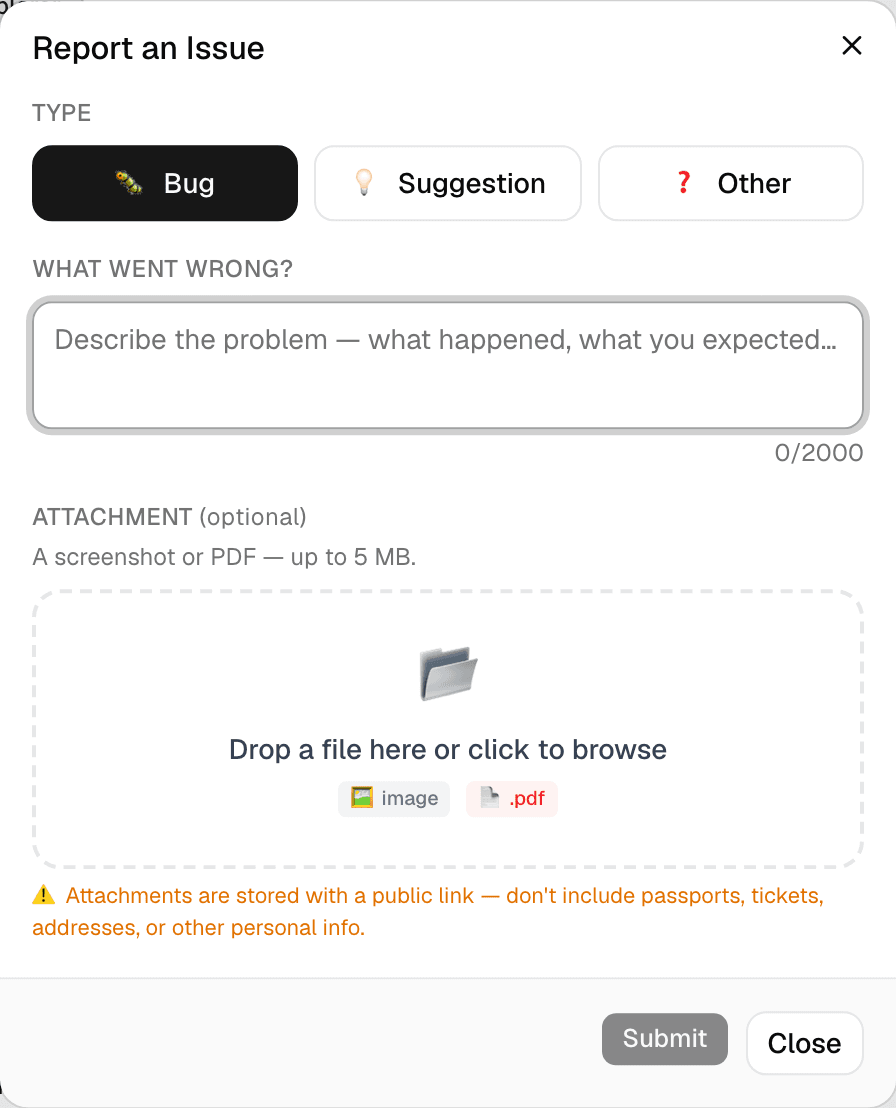
Step 1 of 2 — Available from your Profile page and every trip's Settings tab.
How to Report an Issue or Give Feedback
Something broken, confusing, or missing? Tell us directly — no separate email, no support ticket system.
Step 1 — Open Report an Issue
You'll find Report an issue in two places:
- Your Profile page
- Any trip's Settings tab (useful if the issue is specific to that trip)
Step 2 — Pick a type
Choose Bug (something's broken), Suggestion (an idea for something new), or Other.
Step 3 — Describe it
Write what happened and what you expected, or describe your idea. Up to 2,000 characters.
Step 4 — Attach a screenshot (optional)
Drop in an image or PDF, up to 5MB — useful for showing exactly what you're seeing. Attachments are stored with a public link, so avoid anything showing passports, tickets, addresses, or other personal info.
Step 5 — Submit
Tap Submit. Your report is logged and turned into a real tracked issue on our end — we read every one.
A couple of things to know
- Every report you've submitted shows up in your Issue History on the Profile page, so you can track what happened to it.
- You can go back and replace, remove, or add an attachment to a report you've already submitted, right from your Issue History.