
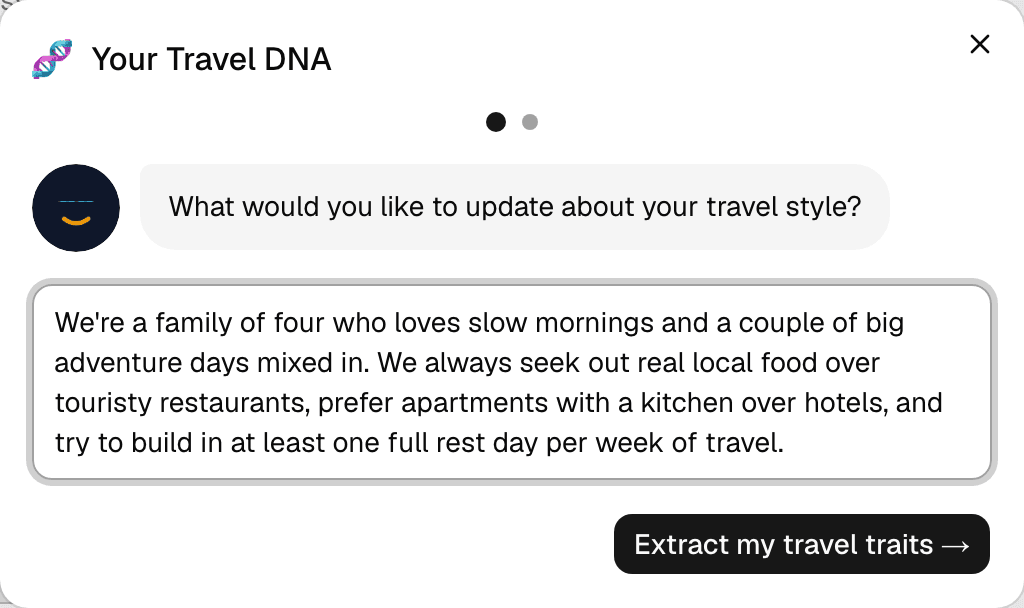
Step 1 of 2 — Describe how you travel, in your own words.
How to Set Up Your Travel DNA
Your Travel DNA is a short profile of how you actually like to travel — pace, food preferences, activity style, family setup. Set it up once, and every AI suggestion Voy makes (see the next guide) is shaped by it.
Step 1 — Open Travel DNA
Go to your Profile page and find the Travel DNA card. Tap Start (or Update if you've done this before).
Step 2 — Tell Voy about yourself
Write freely — a couple of sentences is enough. Mention things like your group size, pace (relaxed vs. packed), food preferences, accommodation style, or anything that makes a trip work for you. There's no wrong way to answer.
Step 3 — Review the traits Voy picked up
Tap Extract my travel traits. Voy reads what you wrote and turns it into a set of short trait chips, grouped by category — Family Dynamics, Pace, Activities, Food, and more.
Step 4 — Fine-tune it
Remove any chip that doesn't fit with its ×, or add your own using the Add a custom trait field at the bottom.
Step 5 — Save
Tap Save my Travel DNA. It's now part of your profile and feeds every Voy suggestion from here on.
A couple of things to know
- You can update your Travel DNA anytime from the same card on your Profile page — nothing is locked in.
- After a completed trip, SimplyVoy may ask a quick follow-up ("Did anything change about how you travel?") to keep it current.
- This is what powers Plan with Voy — see the next guide for how AI trip suggestions actually use it.